Managing sessions usually involves the following tasks:
- Creating a Session
- Making a Session-Based Access Request
- Sending a Heartbeat
- Halting a Session
- Ending a Session
- Configuring the Automatic Charge Interval
The examples and descriptions on this page assume the standard automatic charge interval of one hour. However, the automatic charge interval can be configured for anything from 10 minutes to 24 hours. Refer to the section on Configuring the Automatic Charge Interval for more information.
The client application initiates a session by issuing a POST to the /api/<version>/sessions endpoint. The request body must contain the following:
- The instance that the session should run in.
- For authorization, a JWT which must contain an instance ID which matches the instance ID included in the headers.
The API returns a UUID identifying the session, which is generated by Elastic Access, and which subsequent session activity must use. (It is not possible for the producer’s software to specify a session ID. It can only be generated by Elastic Access.)
When a session is first created, it is in an IDLE state.
The client application makes a session-based access request by sending a PUT to the /api/<version>/sessions/{sessionID} endpoint. The request body must include a list of items for which tokens will be charged, and requester information identifying the user or device making the request.
The following describes the behavior when an application makes an access request within a session:
- For authorization, the request body must include a valid JSON Web Token (JWT). The JWT must contain an instance ID which matches the instance ID included in the headers.
- When the request is made, the items requested will be charged for.
- When one or more items are being charged for in a session, the session is in an ACTIVE state.
- When an access request is made, the client application can specify the action to take if it is denied. Options are:
- Rollback, using the field
rollbackOnDeny = true. The items being charged for in a session will remain the same as they were before the access request and the automatic charge timing will not change. The session will remain ACTIVE. - Do not rollback, using the field
rollbackOnDeny = false. The session moves to a TERMINATED state, halts the repeat charge process, refunds any tokens charged for the remainder of the automatic charge period, and it is not possible to make any more access requests to that session. A new session will be required to resume activity.
- Rollback, using the field
The following describes the behavior when an application requests multiple items:
- If multiple items are requested in a session, Elastic Access fulfills all the items, or none of the items. If it is only possible to fulfill some of the items then the entire request fails, and an error response is returned.
This behavior differs from that of one-off access requests, where Elastic Access attempts to fulfill and charge for as many items as possible. See also Requesting Multiple Items in One-Off Access Request.
- Once the first set of items has been requested, Elastic Access automatically repeats the charge for those same items once per hour, until one of the following occurs:
- The session is deleted.
- The software fails to send a heartbeat in the required time (see Sending a Heartbeat).
- Insufficient tokens are available to make the automatic charge.
- In all three cases listed above, the session status changes to TERMINATED and no further access requests are possible. A new session is needed for subsequent activity.
- Multiple access requests can be made to a session, changing the combination of items that are being charged for in the session. When a subsequent access request is made, Elastic Access restarts the timer for automatic charges, always making repeat charges at hourly intervals after the most recent access request.
- Access requests are regenerative. Therefore, any access request replaces the previous list of items that were requested.
- An access request may contain an empty list of items, which is how software "returns" the items it is using to pause repeat charging. The session state returns to an IDLE state. See also Halting a Session.
Once a client application has made a successful access request in a session, it must send a regular heartbeat to the session to confirm that the client is still using the items. The application must do this using a GET to the /api/<version>/sessions/{sessionID}/heartbeat endpoint. Elastic Access must receive a heartbeat within 30 minutes of the last automatic charge made by the session.
The client must read the response to the heartbeat. If the response is a status 204, the client can continue using the application. If any other status is returned, the client should not continue using the application and ought to close it.
Note that the client application is not required to send a heartbeat after the initial charge. However, it must send a heartbeat after each automatically repeated charge to keep the session going. The application should not send heartbeats more frequently than required.
If Elastic Access does not receive a heartbeat or session-end request within 30 minutes of the last automatic charge, it assumes that the client is no longer using the most recently requested items and that the most recent automatic charge was made in error. Hence Elastic Access does the following:
- Refunds tokens charged in the last automatic charge.
- Sets the session to a TERMINATED state.
- No longer accepts access requests for the session.
If the client wants to start using an application or items again, it must restart the process by creating a new session and requesting items.
To ensure that a charge is made for the whole time the application was running, even if it is shut down just before the heartbeat is due to be sent, it is recommended that the application is made to send a session-end request on closure. Once Dynamic Monetization receives an explicit call to end the session, it will calculate charges up to the point that the application is closed.
For more information about automatic charges, see Automatic Charging Concepts.
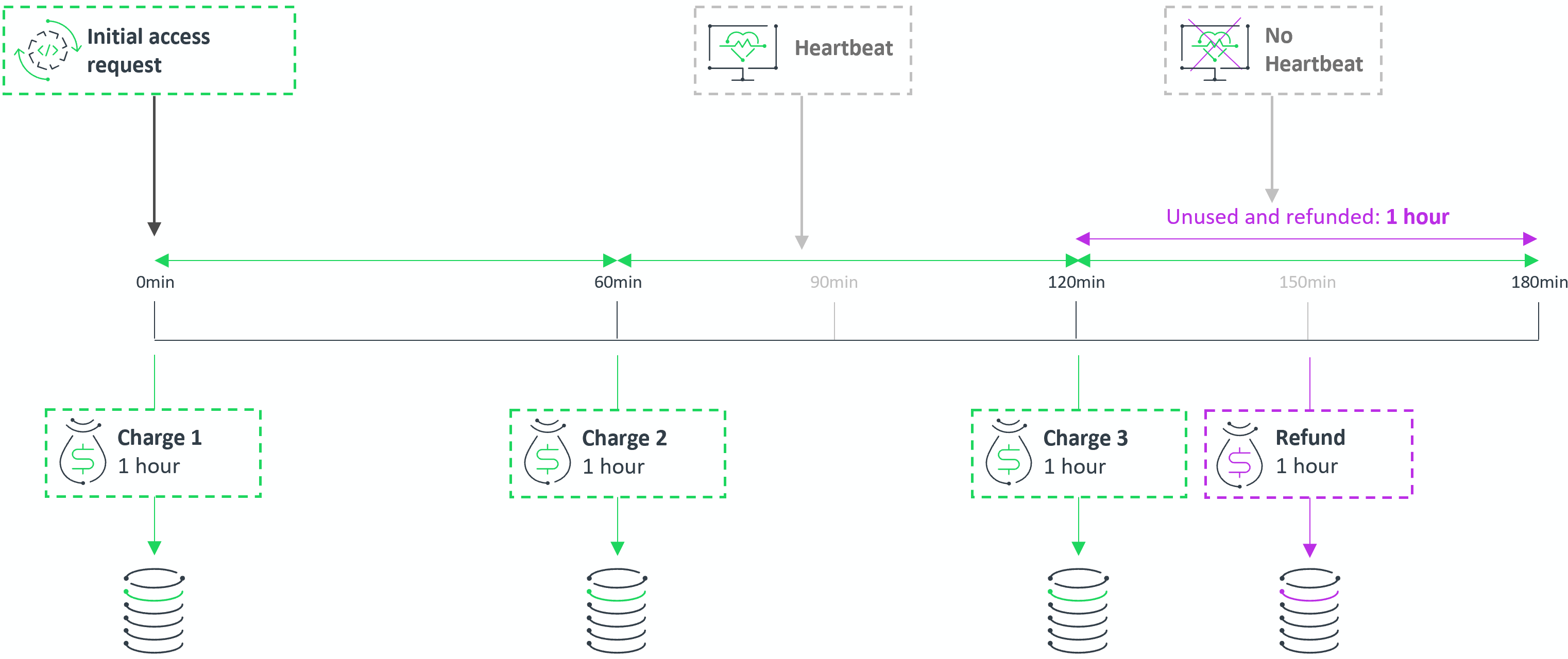
The following sequence lists the events that occur when a client application requests an item as part of a session:
- 0 minutes: Start of timeline. The client application requests items. Elastic Access makes charge 1 and sends usage information to the data warehouse.
- 60 minutes: Automatic charge 2 is made after one hour. Usage information is sent to the data warehouse.
- Within 30 minutes of automatic charge 2: The client application sends a heartbeat.
- 120 minutes: Automatic charge 3 is made. Usage information is sent to the data warehouse.
- 150 minutes: 30 minutes have passed since the last automatic charge (charge 3), without Elastic Access receiving a heartbeat from the application. Elastic Access assumes that the client has shut down the application and is no longer using it. Elastic Access therefore does the following:
- Ends the session. The session accepts no more access requests and its state changes to TERMINATED.
- Issues a refund for the entire automatic charge 3 made at 120 minutes and sends this information to the data warehouse.
Elastic Access also allows temporarily halting a session. This can be useful in scenarios where a client application wants to stop using an item temporarily and then pick it up and continue using it within the same session at a later point in time.
To halt a session, the client application sends an empty list of items in a session-based access request. Elastic Access refunds any charges for the remainder of the current session and changes the session state to IDLE. No automatic charges are made while the session is IDLE. When the client application is ready to continue its use of the same item, or different items, it needs to send a new access request. This returns the session state to ACTIVE. The session continues and the client application can request and use items until it ends.
Halting a session is useful for tracking the end-to-end use of an application, because it avoids the fragmentation of usage data. In addition, it helps customers maintain costing allocation to a single business activity or accounting event.
Sessions can be halted—that is, remain in an IDLE state—for a maximum of 30 days. After that, the session is terminated and can no longer be used. Once the session has been terminated, an error is returned to a client application if it tries to use that session.
Key points
- Sending an empty list of items halts a session.
- Halted sessions are in an IDLE state.
- Halting a session triggers a refund (if applicable) of the remainder of the current charging hour.
- No automated charges are made while the session is IDLE.
- No heartbeat is required while the session is IDLE.
- Sending a non-empty access request returns the session to ACTIVE.
- Sessions can be halted for 30 days maximum.
To ensure that token consumption is calculated for the precise time the items have been in use, the client application should be configured to close a session it is using when it stops running.
The client application ends the session using a DELETE call to the /api/<version>/sessions/{sessionID} endpoint. After a session has been deleted, it cannot be used again. Subsequent activity requires the creation of a new session, resulting in a new session ID.
Elastic Access automatically ends a session in the following scenarios:
- The software fails to send a heartbeat in the required time (see Sending a Heartbeat).
- Insufficient tokens are available to make the automatic charge. A deleted or ended session is placed in a TERMINATED state.
The automatic charging process used in sessions ensures that a customer has sufficient tokens available for an hour's use, before items can be requested in a session. It also mandates that the customer has enough tokens available each time a session automatic charge is made.
For some customers, a full hour’s worth of tokens might be a significant requirement. When most sessions are extremely short lived, for example, it is only reasonable to check for sufficient tokens for a short period of time. It is therefore possible to configure Elastic Access to operate at a shorter automatic charge interval—anywhere between 10 minutes and 24 hours.
When sessions are used, they effectively turn a rate table rate into a "per hour" rate. If, for example, the item "High Performance Compute" has a rate of 10 tokens, within a session this is "10 tokens per hour". If a different automatic charge interval is set, that changes the time-based rate definition. For example, if the cycle duration is 20 minutes, then a rate of 10 tokens is "10 tokens per 20 minutes".
The automatic charge interval can be configured using the /configuration endpoint. This configuration will be the same across all your customers: it is not possible to configure different cycle durations for different customers. You should therefore choose your automatic charge interval during design time, before your implementation goes into production, because changing it will require not only setting the duration in Elastic Access, but also switching your client applications to heartbeat at an appropriate interval. Coordinating these things means bringing all sessions to a halt, making the change, and then starting up again—a disruptive step.
The details in all the sections explaining sessions have used a one-hour automatic charge interval, but when a different automatic charge interval is configured then some details will change, especially the heartbeat. If a different automatic charge interval is required, the interval used for heartbeat will be changed in proportion to the change for cycle duration. For example:
- If the automatic charge interval is changed to 10 minutes, this is one sixth of the normal one hour interval.
- The heartbeat interval will therefore be one sixth of the standard 30 minutes, which is five minutes.